
Getting Started
Binance Stocks Eligibility and First-Order Checklist
Verify account eligibility, beneficial ownership, custody, funding, session and every preview field before placing a first Binance Stocks order.
Last fact check: August 24, 2026. This guide does not claim that Binance Stocks is available to every reader. Another user’s screen, a VPN location or a general country list cannot establish your eligibility; verify it from accurate KYC data, the product view inside your account and the terms presented to you.
Treat the first-order review as a sequence of stop-or-proceed gates: account eligibility, instrument identity, legal interest, funding path, order settings, preview and evidence. Stop at the first unresolved gate rather than treating a visible Stock button as approval to deposit or trade.
Table of contents
- Review the seven-stage map
- Confirm eligibility
- Identify the instrument
- Understand ownership and custody
- Inspect funding and order rules
- Audit the preview
- Save the records
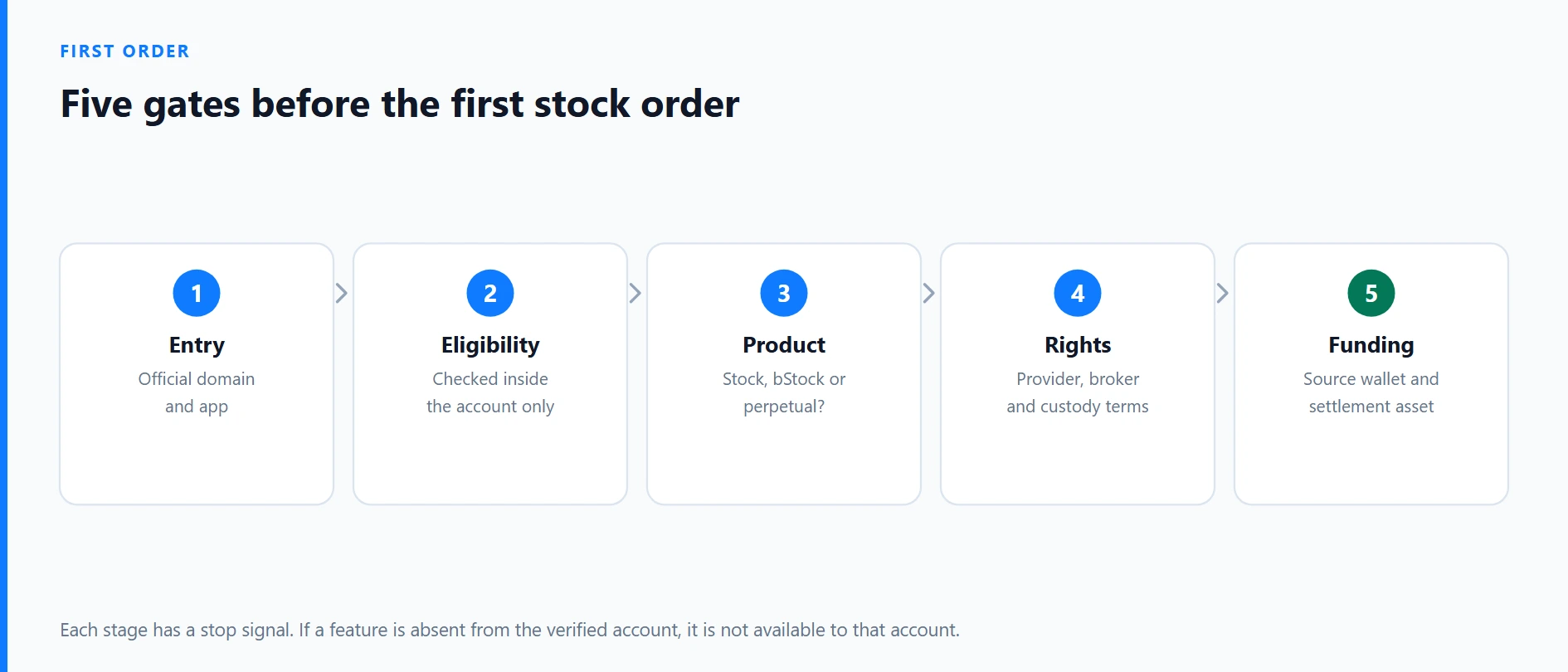
The seven-stage first-order map
| Stage | Purpose | Stop signal |
|---|---|---|
| 1. Entry | Verify official domain and account | Unknown domain, app or unsolicited link |
| 2. Eligibility | Confirm Stock is enabled in the verified account | VPN, false residency or someone else’s documents required |
| 3. Product | Separate a Stock from a bStock or perpetual | Futures, leverage, funding or a token contract is shown |
| 4. Rights | Read provider, broker and custody terms | Legal party or asset treatment remains unclear |
| 5. Funding | Select Funding/Spot and settlement asset | Conversion or return path is unclear |
| 6. Order | Select market/limit, session and duration | Preview conflicts with the written plan |
| 7. Record | Reconcile execution and statement | Ticker, quantity, price or fee differs unexpectedly |
1. Check eligibility only inside the account
Navigate independently to the official app or binance.com. Confirm KYC status, account country and new notices, then look for Trade → Stock. If the feature is missing, update the official app and ask official support for an account-specific answer. Do not use a VPN, false address or another person’s identity to bypass the restriction.
A visible Stock button still does not establish local legal or tax compliance. Treat eligibility as unresolved if the feature disappears after KYC, the account-specific terms cannot be opened, the legal entity is unclear, or access would require inaccurate identity or residence data. Use the safe account-registration guide for the separate security process.
2. Identify the product with five signals
The company’s full name, ticker, listing exchange, “Stock” label and Trade → Stock location should agree. These clues point to a different instrument:
- a ticker ending in “B” plus a token contract can indicate a bStock;
- Futures/TradFi, a USDT contract, leverage and funding indicate a stock perpetual;
- an ETF name indicates a fund rather than one company;
- an ADR label indicates a depositary receipt that can carry a periodic fee;
- a “Tokenize my shares” choice can change the end result from a brokerage-held share to a bStock.
Use the three-product comparison when the product identity is not obvious.
3. Summarize the legal structure in one sentence
Binance’s Academy guide, updated June 4, 2026, says Stocks Trading is provided by Nest Trading Limited with an external brokerage partner. Purchased shares remain in the brokerage partner’s custody, while the user is described as the beneficial owner and may receive applicable dividends and corporate-action rights.
That is not direct registration in your name at the issuer. In the client agreement, find the service entity, broker or custodian, asset-segregation language, complaint route, insolvency treatment, transfer rules and treatment of fractional positions when an account closes. If you cannot find or understand those terms, stop before depositing substantial money.
4. Run a zero-value screen review
Before moving funds, run a zero-value rehearsal: open the product screen, enter no order, and record which Funding or Spot source, payment assets, order types, sessions, time-in-force choices and fee labels are actually available. An absent field is a stop signal, not permission to infer that the guide or another user’s account applies to yours.
The current official guide says orders are primarily settled in USDC. It lists USDC, BNB, USDT, U and USD1 as supported funding assets and says a non-USDC asset can be converted at order submission. Supported assets can vary or change. Conversion can create an additional cost and record-keeping event; the funding guide maps the path from crypto balance to stock and back to USDC.
5. Choose market or limit together with the session
A market order prioritizes execution at the available market, not the last displayed price. The Binance guide says market orders are active only in Regular Trading Hours. In other sessions they may queue for the next regular open, when price can differ materially from the earlier quote.
A limit order defines the highest purchase price or lowest sale price you will accept but may not execute. DAY expires at the end of the relevant trading day. GTC can remain active for up to 90 days under the current guide, but is unavailable for fractional orders. Selected instruments may offer Regular, Extended or 24-Hour sessions; only selected stocks support the broadest session.
Check your local time against US daylight-saving changes. Outside the main session, liquidity can be thinner and the bid/ask spread wider. The market-versus-limit guide explains the execution trade-off.
6. Audit every line of the preview
Read these fields aloud or against a written checklist:
- company, ticker, exchange and instrument label;
- Buy or Sell side;
- whole or fractional quantity;
- market or limit price;
- Regular, Extended or 24-Hour session;
- DAY or GTC time in force;
- Funding or Spot account;
- payment asset and conversion rate;
- trade value, platform fee or spread, and estimated total;
- any option, such as tokenization, that changes the resulting product.
The current fee guide describes a 0.35 USD platform fee for trade values of 350 USD or below, and a 0.1% spread above 350 USD. ADR, conversion, dividend, regulatory and tax costs may also apply. Verify live figures because the product specification can change. If any preview field conflicts with the plan, return without confirming.
7. Save three records after a small first order
The advertised 5 USD minimum is a product threshold, not a recommended position size. Keep a first test small enough that an execution surprise, price fall, tax issue or delayed access cannot threaten essential savings. Do not borrow for a trial order.
After execution, preserve three independent forms of evidence:
- order history showing status, average price, filled quantity and any open remainder;
- the account statement or available CSV/PDF record proving the resulting position;
- wallet and conversion history showing the original payment asset, unused USDC and the destination of later sale proceeds.
The current guide says sale proceeds are credited in USDC to the Funding Account. Save the order ID, timestamp and time zone, original funding asset, conversion rate, fee and final quantity for local tax records. Reconcile partial fills and open limit quantities before placing another order.
Final decision rule
Eligibility, instrument identity, legal provider, custody, funding route and order preview should all be clear at the same time. The purpose of a first order is not to maximize exposure; it is to verify, at survivable scale, how the service executes and how the resulting records appear.